Bootstrap or Tailwind columns stack in your PDF? Here’s why and how to fix it
Why col-md and md:grid-cols collapse to one column on A4, the measured page widths, and three fixes.
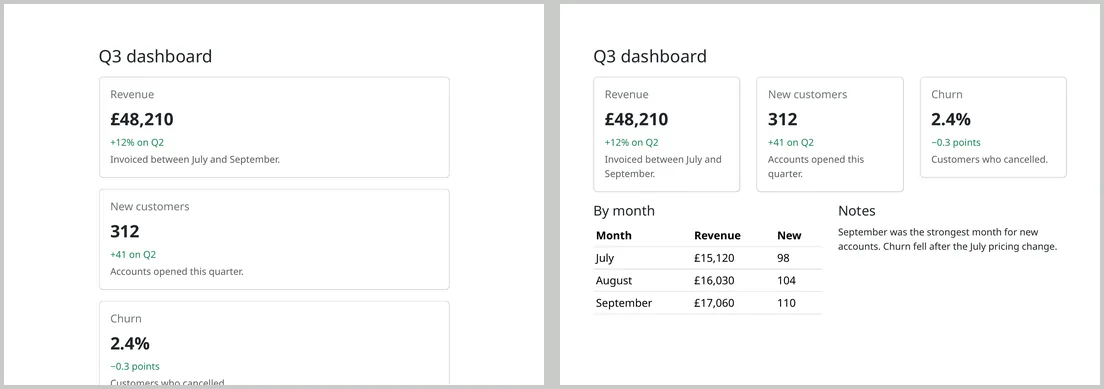
Your dashboard has three cards side by side on screen. In the PDF, they’re stacked one above the other like on a phone. Nothing is broken: the PDF page is narrower than the breakpoint your framework uses for “desktop”, so it picks the mobile layout.
What we saw
We converted a Bootstrap 5.3 page using col-md-4 cards and a Tailwind 4 page using md:grid-cols-3, both with default settings. Both came out as a single column.
Why it happens
When the page is laid out for print, CSS media queries are measured against the printable width of the paper, not your screen. A4 portrait with the default 10 mm margins is about 720 CSS pixels wide, and the md breakpoint in both Bootstrap and Tailwind is 768px. We measured each paper setup:
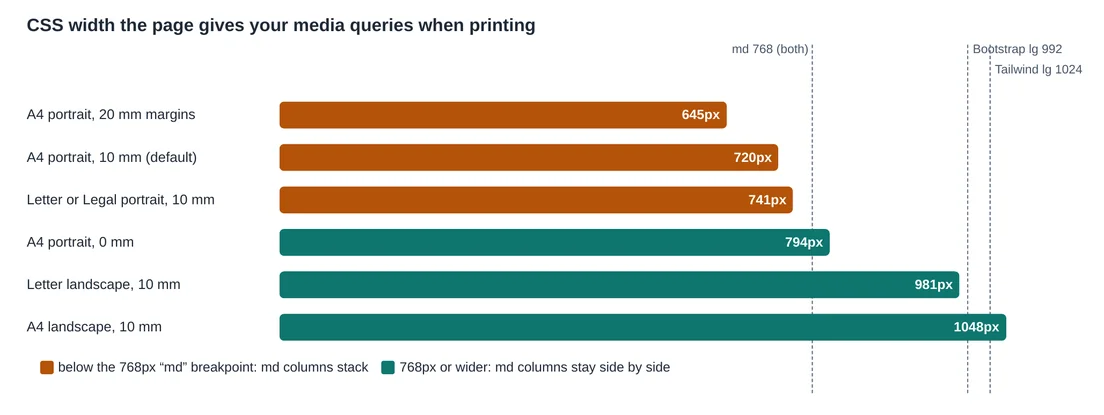
Bootstrap’s .container is affected too: at about 720px it uses its 540px small-screen width, which is why the stacked version is also narrow.
Fix 1: print overrides
Keep the responsive classes for screens and force the desktop layout only when printing:
@media print {
  .container { max-width: none; }
  .col-md-4 { flex: 0 0 auto; width: 33.333%; }
  .col-md-6 { flex: 0 0 auto; width: 50%; }
}
This produced the right-hand result above. Add a line for each column class your layout uses.
Fix 2: Tailwind’s print variant
Tailwind has a built-in print: variant, so you can state the print layout in the markup:
<div class="grid grid-cols-1 md:grid-cols-3 print:grid-cols-3 gap-4">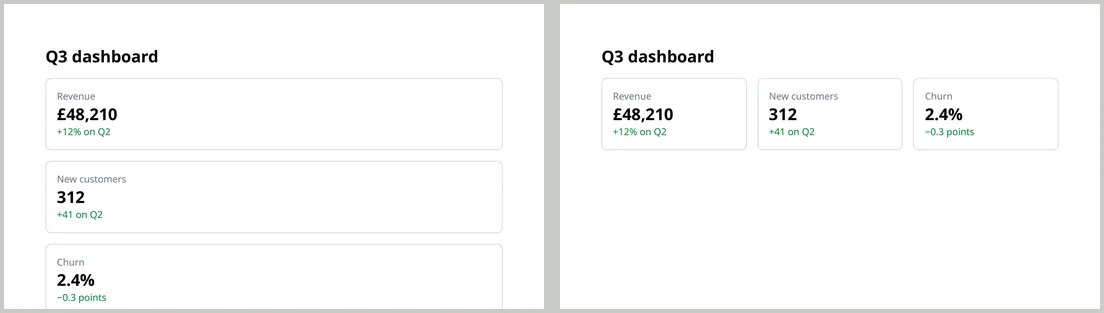
Fix 3: change the page
If you can’t edit the CSS, change the settings. A4 or Letter landscape is wider than 768px, and A4 portrait with 0 mm margins is about 794px. Both kept the Bootstrap cards side by side in our test. Landscape suits dashboards; 0 mm margins only suits designs that have their own padding.
For documents, skip the breakpoint
If a page exists only to become a PDF, use the non-responsive classes, such as col-4 in Bootstrap or grid-cols-3 in Tailwind. Then there is no breakpoint to fall below.
Two more things we noticed
- Scripts see a different width. JavaScript runs before the print layout and saw a 780px-wide window, while CSS saw about 720px. Code that measures the window, such as some chart libraries, sizes things for the wrong width; see charts in HTML to PDF.
- Dark mode is off.
prefers-color-scheme: darkdidn’t match, so sites with a dark theme convert in their light theme.
Tailwind’s browser build, which generates styles with JavaScript, ran before the PDF was made in our test and applied every class. A compiled stylesheet is still the more predictable choice for documents you generate often.