Case study
Case study: Chart.js bars at 7% height in a PDF
A real chart captured mid-animation, and the one-line Chart.js option that fixed it.
Chart libraries animate charts into place by default. People see a smooth reveal; a PDF converter sees whatever frame was on screen when it captured the page. We converted a simple Chart.js bar chart to measure the effect.
The document
A heading and a 680×340 canvas with six monthly values (120 to 480), drawn by Chart.js 4.4 loaded from the jsDelivr CDN, with default options except responsive: false.
Before: default animation
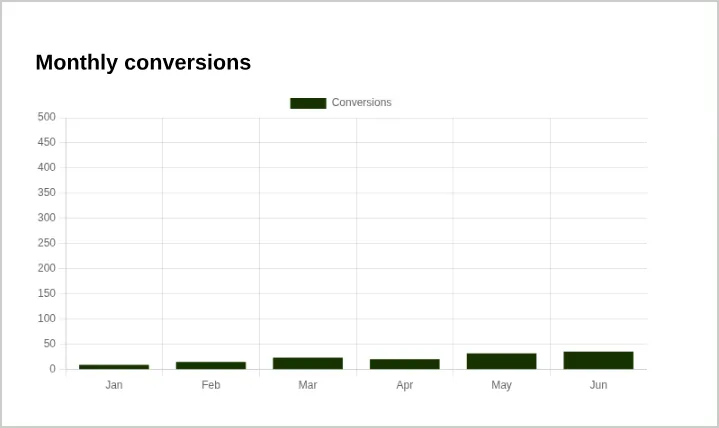
The axes, labels and legend were complete, but every bar was drawn at a small fraction of its value. June’s bar, which should reach 480, stopped below the 50 line, about 7% of its true height. Anyone reading this PDF would take away the wrong numbers.
After: animation turned off
options: { responsive: false, animation: false, devicePixelRatio: 3 }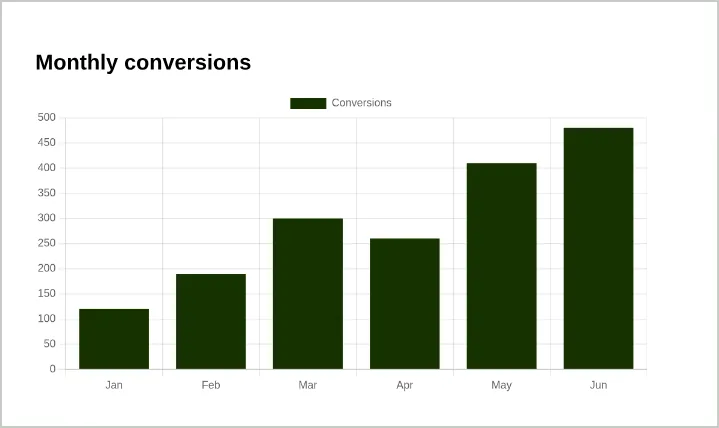
With animation: false every bar was drawn at its true height. We also set devicePixelRatio: 3 so the canvas is rendered at higher resolution and stays crisp when zoomed. That made the PDF larger: 74,120 bytes versus 19,968, still small for a one-page report.
What we learned
- Always disable chart animation for documents that will be converted. The failure is silent: the chart looks plausible, just wrong.
- Loading the library from a public CDN worked without problems.
- Consider SVG charts for print; they’re sharp at any size without raising the resolution. See charts in HTML to PDF.