Case study
Case study: which fonts actually end up in your PDF
A font-by-font test of what the converter really embeds, including Verdana becoming a serif font.
Fonts are where a PDF most often differs from what you saw on your own computer. Your laptop has Arial, Georgia and Verdana installed; a converter running on a Linux server usually doesn’t. We tested exactly what happens.
Test 1: common system font names
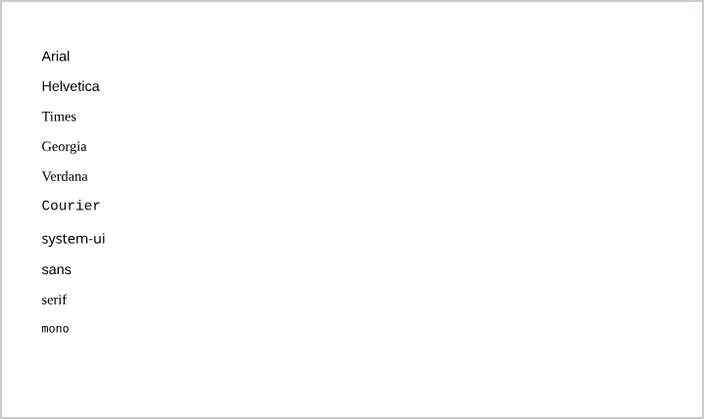
One line of text for each font-family, then we read the font names embedded in the PDF:
| You asked for | PDF used |
|---|---|
Arial, Helvetica, sans-serif | Liberation Sans |
Times New Roman, serif | Liberation Serif |
| Courier New | Liberation Mono |
monospace | DejaVu Sans Mono |
system-ui | Noto Sans |
| Georgia | Liberation Serif (substituted) |
| Verdana | Liberation Serif (substituted, now a serif) |
Liberation Sans, Serif and Mono are designed with the same character widths as Arial, Times New Roman and Courier New, so layouts using those fonts keep their line breaks. Fonts that aren’t installed fall back to the default font, which is a serif. That’s how Verdana, a sans-serif font, came out as a serif.
Test 2: a Google Font
We linked Lora (weights 400 and 700) from Google Fonts with a standard <link> tag. The PDF embedded Lora as requested. The PDF grew from 26,339 bytes (system serif) to 72,851 bytes because the font is embedded, and conversion took 551 ms versus 476 ms.
Test 3: a font URL that returns 404
We pointed an @font-face rule at a font file that doesn’t exist. The conversion still succeeded: the browser skipped the missing font and used the next font in the stack. Your PDF won’t warn you; it simply uses a different font.
What we learned
- Always finish a font stack with a generic family, such as
font-family: Verdana, Arial, sans-serif;, so a missing font falls back to the right style. - For a specific look, use a web font from a public URL or embed it; then it’s the same everywhere.
- Check the preview when fonts matter: missing fonts don’t cause errors.