Iframes, videos and embeds in HTML to PDF: what you get
Tested: iframes are clipped to their frame, videos print their poster image, and how to replace both in a PDF.
Web pages embed other content all the time: a table from another page, a map, a video. A PDF is static, so we converted a page with an iframe and a video to see what survives.
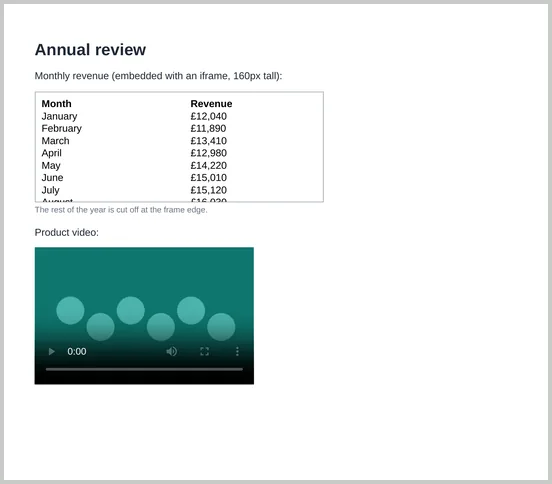
Iframes are clipped to their frame
The iframe held a 12-month table but was 160px tall. The PDF showed only the rows that fit inside the frame. The rest wasn’t on a later page; it wasn’t in the PDF at all. Frames don’t grow or split across pages.
- Best fix: put the content in the page itself instead of an iframe.
- If it must stay an iframe, give it a height that fits all its content and keep it on one page with
break-inside: avoid. - Declare the framed page’s encoding. In our test, a framed page without
<meta charset="utf-8">, served without a charset, showed “£” as “£”. Add the meta tag to framed pages.
Videos print as a still with controls
A <video> printed its poster image, with the play button, time and other controls drawn on top. The conversion still succeeded when the video file itself was missing. Without a poster, we got a dark grey box with the same controls.
For a cleaner PDF, swap the player for an image and a link when printing:
<figure class="video">
  <video controls poster="intro-poster.jpg" src="intro.mp4"></video>
  <a class="print-only" href="https://example.com/intro-video">
    <img src="intro-poster.jpg" alt="Product introduction video">
    Watch the video: example.com/intro-video
  </a>
</figure>

<style>
  .print-only { display: none; }
  @media print {
    .video video { display: none; }
    .print-only { display: block; }
  }
</style>
The link stays clickable in the PDF; see links in PDFs.
Maps, social posts and other widgets
Most third-party embeds are iframes or scripts, so the same limits apply: only what fits in the frame is shown, and content that loads late or needs interaction may be blank. For a reliable PDF, use a static image of the map or post, with a link to the live version.