Chinese, Arabic, Hindi and emoji in HTML to PDF
A tested list of scripts that work out of the box, the lang attribute that picks the right Chinese glyphs, and right-to-left text.
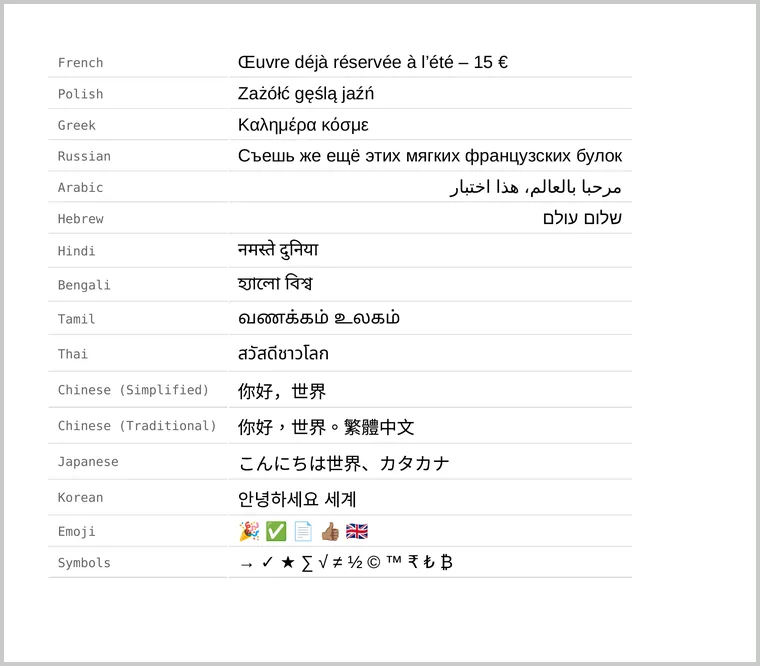
A PDF can only show characters that a font on the converter covers. If it has none, you get empty boxes, often called tofu. We converted a page with sixteen languages and symbol sets to see what the converter has built in.
What works with no extra fonts
- Latin, Greek and Cyrillic, including accents, the euro sign and typographic quotes.
- Arabic and Hebrew, joined and laid out right to left.
- Indian scripts such as Devanagari (Hindi), Bengali and Tamil, plus Thai, using Noto fonts.
- Chinese, Japanese and Korean, using Noto Sans CJK.
- Emoji in colour, including skin tones and flags, using Noto Color Emoji.
- Common symbols: arrows, ticks, stars, maths signs and currency signs such as ₹, ₺ and ₿.
Chinese needs the right lang attribute
Chinese, Japanese and Korean share many characters but draw some of them differently. The converter chooses the regional font from the page’s language:
<html lang="zh-CN">   <!-- Simplified Chinese -->
<html lang="zh-TW">   <!-- Traditional Chinese -->
<html lang="ja">      <!-- Japanese -->
<html lang="ko">      <!-- Korean -->
In our test, the matching regional font was used for each lang. With no lang, or with lang="en", Chinese text was drawn with the Japanese font, so some characters take their Japanese shapes. Set lang on <html>, or on the element that holds the text in a mixed-language page.
Right-to-left text
<html lang="ar" dir="rtl">
<!-- or, for one passage in an English page: -->
<p lang="he" dir="rtl">שלום עולם</p>
dir="rtl" sets the text direction and also mirrors the page layout, such as text alignment and list bullets, which is what Arabic and Hebrew readers expect.
When you want a particular look
The built-in fonts are clean, neutral sans-serifs. For a branded or traditional style, such as a Naskh Arabic or a Chinese serif, load a web font from a public URL with @font-face or a Google Fonts link. Fonts for Chinese and Japanese are large, so keep to the weights you use.
If you still see boxes
- Check the encoding. Save the file as UTF-8. The converter rejects files that aren’t, rather than printing garbled text.
- Check the font stack. A web font that lacks a character falls back to the next font listed. End the stack with a generic family such as
sans-serif, not a single named font. - Rare scripts and symbols may not be covered. Embed a web font that includes them.