Why your PDF has a blank extra page, and how to remove it
The 8-pixel body margin that adds an empty page, what doesn’t cause one, and how to find the culprit.
You designed a single page: a certificate, a cover, a poster. The PDF has two pages, and the second one is blank. Almost always, a few pixels of your design spilled past the bottom of page one.
The most common cause: the default body margin
Browsers give <body> an 8px margin unless you remove it. If an element is exactly one page tall, those 8 pixels push its bottom edge onto a second page. We reproduced it with a landscape certificate set to height: 100vh:
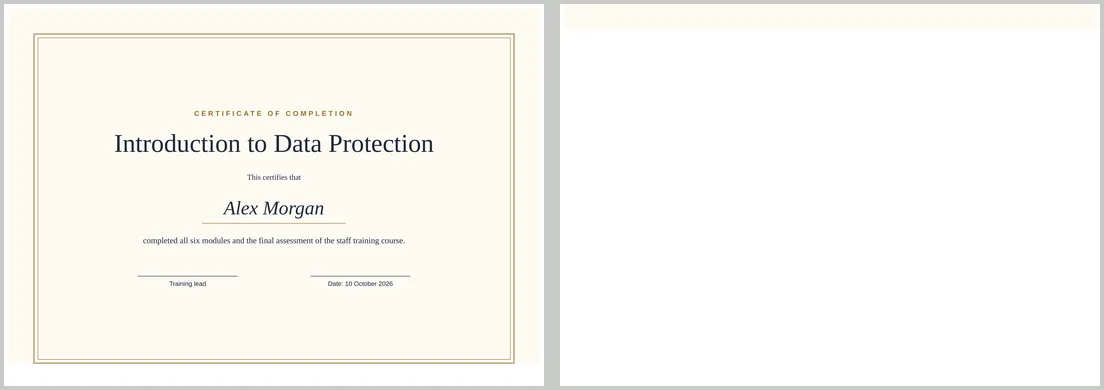
The fix is one line:
html, body { margin: 0; }With it, the same certificate was exactly one page on A4 and on Letter.
Sizing a full-page element
height: 100vhis one printable page, the paper height minus the margins in the converter’s settings. It fitted on one page with both 0 mm and 10 mm margins in our tests.- Add
box-sizing: border-boxto anything with a fixed height and a border or padding. Otherwise they are added to the height and push it over. - Avoid fixed heights in mm when margins aren’t zero.
height: 210mmon A4 landscape only fits with 0 mm margins and no body margin.
What doesn’t cause a blank page
Two page-break rules are often blamed, but neither added a page in our tests:
break-after: pageon the last element: two sections with it gave exactly two pages.break-before: pageon the first element: the converter ignored the break and page one wasn’t left empty.
Other things to check
- Empty elements at the end of a full page, such as a spacer
<div>with a height or margin. - A footer pushed down with large margins or
min-height: 100vhon a wrapper. - Content just over the limit. A page that is genuinely a little too long needs smaller text or spacing; CSS can’t squeeze it back.
Find the culprit quickly
* { outline: 1px solid red; }Convert with this rule and look at the top of the blank page. The red outline that crosses onto it belongs to the element that is too tall.