Free HTML certificate template: make a landscape PDF certificate
A tested landscape certificate template, the settings that keep it to one page, and a script for many names.
Certificates are a natural fit for HTML: a fixed layout, a name that changes, and a PDF you can email or print. This template converts to a single landscape page on A4 or US Letter.
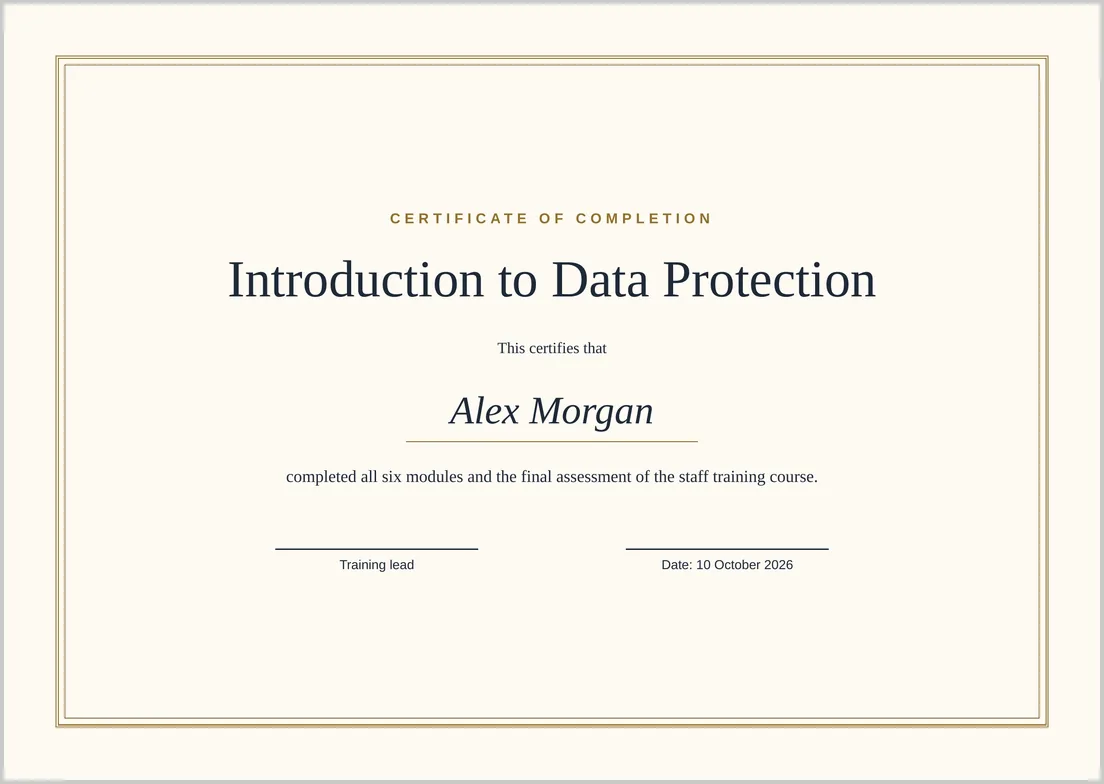
The template
<!doctype html>
<html lang="en">
<head>
<meta charset="utf-8">
<title>Certificate of completion</title>
<style>
  html, body { margin: 0; }
  .certificate {
    box-sizing: border-box;
    height: 100vh;               /* exactly one page */
    padding: 14mm;
    background: #fdfaf3;
    font-family: Georgia, "Times New Roman", serif;
    color: #1f2937;
  }
  .frame {
    box-sizing: border-box;
    height: 100%;
    border: 3px double #92702b;
    outline: 1px solid #92702b;
    outline-offset: -10px;
    display: flex; flex-direction: column;
    align-items: center; justify-content: center;
    text-align: center; padding: 0 30mm;
  }
  .kicker { font: 600 11pt Arial, sans-serif; letter-spacing: .3em;
            text-transform: uppercase; color: #92702b; margin: 0; }
  h1 { font-size: 40pt; font-weight: normal; margin: 6mm 0 4mm; }
  .name { font-size: 30pt; font-style: italic; border-bottom: 1px solid #92702b;
          padding: 0 12mm 2mm; margin: 4mm 0; }
  .reason { font-size: 13pt; max-width: 160mm; line-height: 1.5; margin: 2mm 0 0; }
  .signatures { display: flex; gap: 40mm; margin-top: 16mm; font: 10pt Arial, sans-serif; }
  .signatures div { border-top: 1px solid #1f2937; padding-top: 2mm; min-width: 55mm; }
</style>
</head>
<body>
  <div class="certificate">
    <div class="frame">
      <p class="kicker">Certificate of completion</p>
      <h1>Introduction to Data Protection</h1>
      <p>This certifies that</p>
      <p class="name">Alex Morgan</p>
      <p class="reason">completed all six modules and the final assessment of the staff training course.</p>
      <div class="signatures">
        <div>Training lead</div>
        <div>Date: 10 October 2026</div>
      </div>
    </div>
  </div>
</body>
</html>
Settings to use
- Paste the template into HTML Code.
- Choose A4 or Letter and Landscape.
- Open More settings and set margins to 0 mm so the cream background reaches the edge of the paper.
- Convert and download.
If you keep the default 10 mm margins, the certificate still fits one page, framed by a white border.
Why it stays on one page
height: 100vh makes the certificate exactly one printable page tall, box-sizing: border-box keeps the padding inside that height, and html, body { margin: 0; } removes the browser’s default 8px margin. Without that last line, the certificate spills onto a blank second page; see fixing a blank extra page.
Fonts
The template asks for Georgia, but the converter’s server doesn’t have it, so it uses Liberation Serif, as in the image above. For a particular script or display font, link a web font from a public URL; our font case study shows what the server has.
Making certificates for many people
Use the free API with a short script. The API allows 10 conversions a minute, so wait about six seconds between requests:
import time, requests

template = open("certificate.html", encoding="utf-8").read()
names = ["Alex Morgan", "Sam Patel", "Jordan Lee"]

for name in names:
    html = template.replace("Alex Morgan", name)
    response = requests.post(
        "https://htmltopdf.online/api/convert/html",
        json={"html": html, "settings": {"paper": "A4", "landscape": True, "marginMm": 0}},
        timeout=60,
    )
    response.raise_for_status()
    open(name.replace(" ", "-") + ".pdf", "wb").write(response.content)
    time.sleep(6)
Names that contain < or & should be HTML-escaped before they go into the template.