HTML form to PDF: why fields aren’t fillable, and how to make a printable form
What each form control looks like in the PDF, the traps (placeholders, clipped text), and a write-in form you can print.
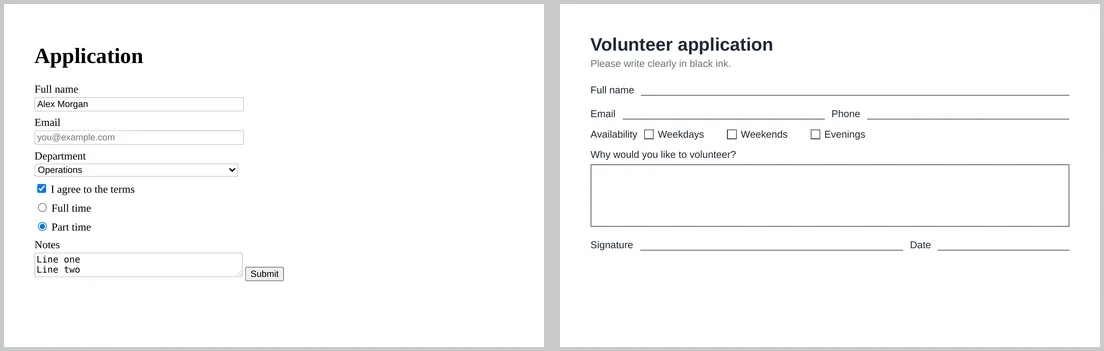
People often hope that an HTML form will become a fillable PDF form. It doesn’t: the converter prints the page, so form controls become a picture of themselves. We converted a typical form to see exactly what you get.
What happens to each control
- Text inputs print their current value inside a box. Text longer than the box is cut off at its edge.
- Placeholders print too, in grey. On paper, “[email protected]” looks like a real answer.
- Dropdowns show only the selected option, with the arrow.
- Checkboxes and radio buttons print ticked or empty, as they were.
- Text areas show only the lines that fit. Our two-row text area holding eight lines printed just the first two.
- Buttons print as buttons that do nothing.
The PDF contained no form fields at all, so nothing can be typed into it. If you need a fillable PDF, add fields afterwards in a PDF editor.
Two good uses
1. A record of what someone submitted
Fill the values in on your server and convert the page, so the PDF is a receipt of the answers. Better still, print the answers as plain text rather than inside inputs, so long answers aren’t cut off:
<dl>
  <dt>Full name</dt><dd>Alex Morgan</dd>
  <dt>Department</dt><dd>Operations</dd>
</dl>
2. A form to print and fill in by hand
Replace inputs with lines and boxes. This is the CSS behind the right-hand form above:
.field { display: flex; align-items: flex-end; gap: 10px; margin: 14px 0; }
.field label { white-space: nowrap; }
.line { flex: 1; border-bottom: 1px solid #374151; height: 20px; }
.box  { border: 1px solid #374151; height: 90px; margin-top: 6px; }
.tick { width: 12px; height: 12px; border: 1px solid #374151; display: inline-block; }

<div class="field"><label>Full name</label><span class="line"></span></div>
<div class="field"><label>Email</label><span class="line"></span>
                   <label>Phone</label><span class="line"></span></div>
<div><label>Why would you like to volunteer?</label><div class="box"></div></div>
Leave about 8 mm of height for each handwritten line, and give free-text answers a large box.
If you must convert a live form
@media print {
  input::placeholder, textarea::placeholder { color: transparent; }
  button, [type="submit"] { display: none; }
  textarea { height: auto; min-height: 6em; }
}
In our test these rules hid the placeholder and the button on the page, although the placeholder text was still in the PDF as invisible text, so it can turn up in search or copy-and-paste. A text area’s content still won’t grow to fit, so for long answers print the text instead of the control.