Add a DRAFT or CONFIDENTIAL watermark to an HTML PDF
A tested CSS watermark that repeats on every PDF page, and what it can and can’t protect.
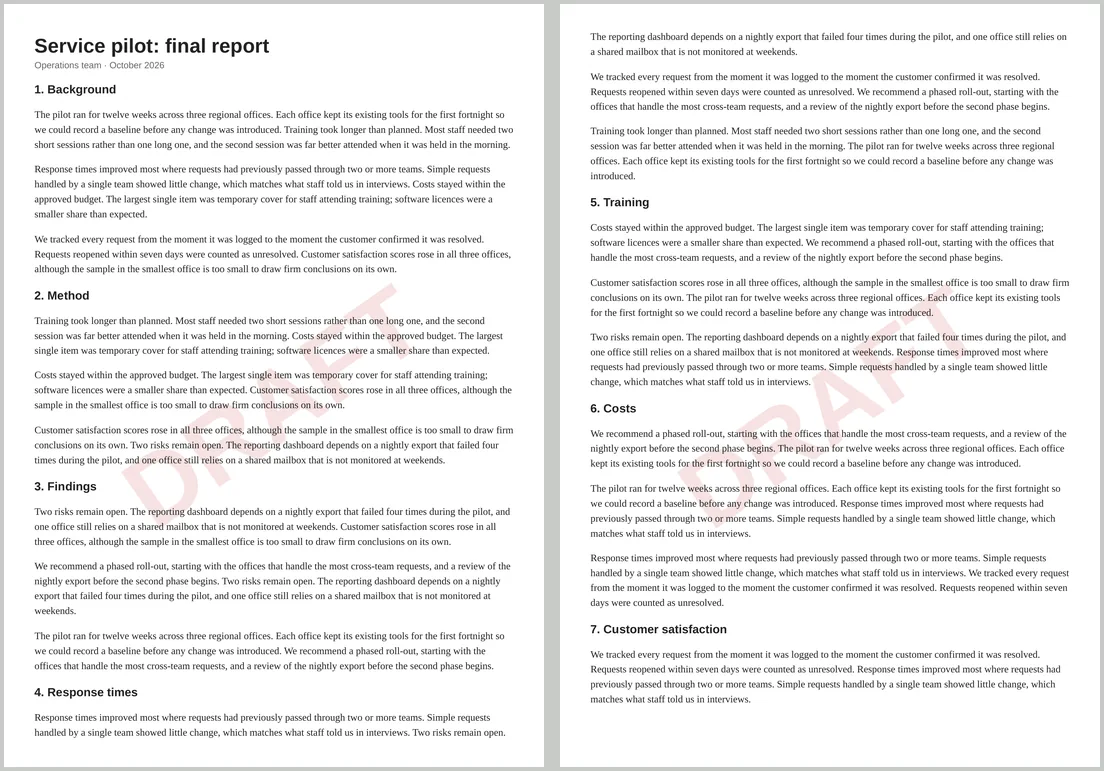
Marking a document as a draft, a sample or confidential is easy when you control the HTML. An element with position: fixed is printed on every page of the PDF, which is exactly what a watermark needs.
Copy-paste watermark
<div class="watermark" aria-hidden="true">DRAFT</div>

<style>
  .watermark {
    position: fixed;
    top: 45%; left: 0; right: 0;
    text-align: center;
    font: bold 110pt Arial, sans-serif;
    color: rgba(190, 30, 30, 0.13);   /* faint, so the text stays readable */
    transform: rotate(-35deg);
    z-index: -1;                      /* behind the text */
  }
</style>
Put the <div> anywhere inside <body>. Fixed elements are positioned relative to each page, so the word appears in the same place on page one, page two and every page after.
Adjusting it
- Strength: change the last number in
rgba(). Between 0.08 and 0.15 keeps the body text readable. - Angle:
rotate(-35deg)runs bottom-left to top-right; use0degfor a horizontal stamp. - Size: long words like CONFIDENTIAL need a smaller font, around 70pt on A4 portrait, or they run off the page.
- Behind or in front:
z-index: -1puts it behind the text. Remove it to stamp over the text instead.
A logo or image watermark
<img class="logo-mark" src="data:image/svg+xml;base64,…" alt="">

<style>
  .logo-mark { position: fixed; top: 35%; left: 25%; width: 50%; opacity: 0.08; z-index: -1; }
</style>
An image works the same way and repeated on both pages of our test. Embed it as a data URL or link to a public image; see fonts and images in HTML to PDF.
Does the Print backgrounds setting matter?
No. A text watermark is coloured text, and in our tests both the text and the image watermark printed with Print backgrounds turned off.
What a watermark doesn’t do
- It isn’t protection. The watermark is ordinary text or an image in the PDF. Anyone with a PDF editor can remove it.
- It is part of the text. When we extracted text from the PDF, “DRAFT” came out with the rest of the page. Search and copy-and-paste will include it.
- The live preview shows it once. The preview is a single long page, so check the converted PDF to see every page.