Printable name badges: an HTML template for 10 badges per A4 sheet
A ready-to-edit badge sheet built with CSS grid and millimetres, measured to fit ten badges on one A4 page.
Event name badges are a perfect job for HTML: a grid of identical cards, each with a different name. This template prints ten 90 × 55 mm badges on one A4 sheet, with dashed cut lines and a coloured label for each role.
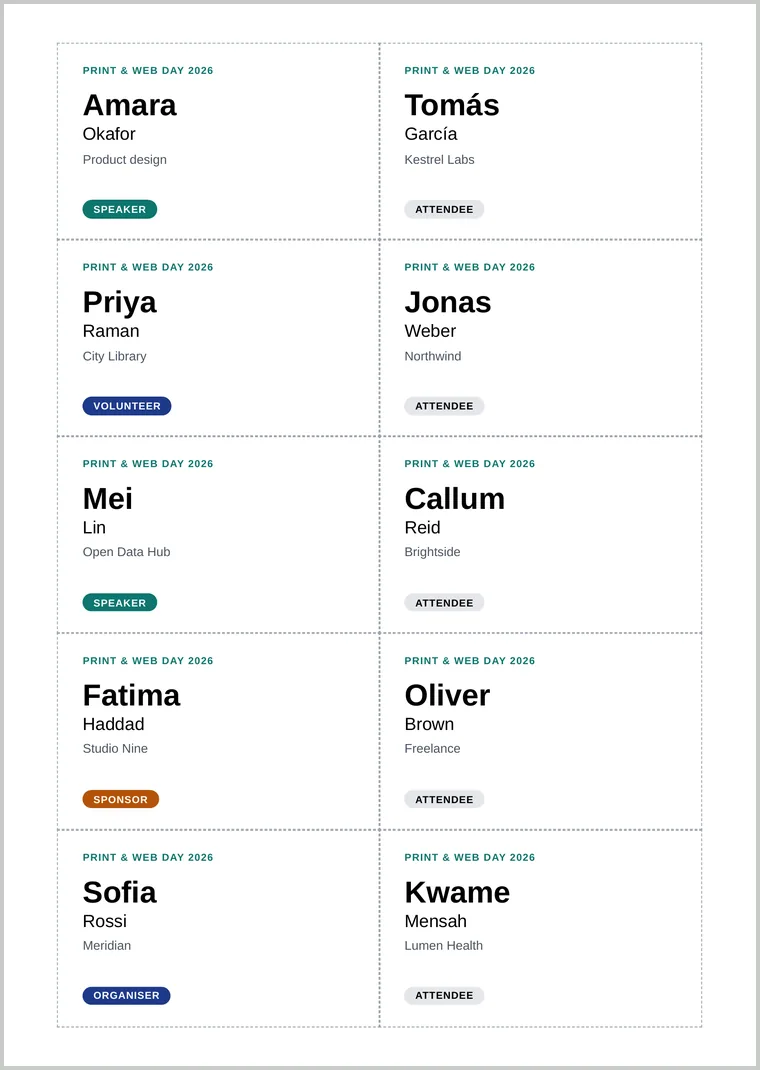
The template
<!doctype html>
<html lang="en"><head><meta charset="utf-8"><title>Name badges</title>
<style>
@page { size: A4; margin: 0; }
html, body { margin: 0; }
body { font-family: Arial, sans-serif; }
.sheet { display: grid; grid-template-columns: repeat(2, 90mm); grid-auto-rows: 55mm;
justify-content: center; padding-top: 11mm; }
.badge { box-sizing: border-box; height: 55mm; padding: 6mm 7mm;
outline: 0.2mm dashed #9ca3af; display: flex; flex-direction: column; break-inside: avoid; }
.event { margin: 0; font-size: 8pt; letter-spacing: .08em; text-transform: uppercase;
color: #0f766e; font-weight: 700; }
.first { margin: 4mm 0 0; font-size: 24pt; font-weight: 700; line-height: 1; }
.last { margin: 1mm 0 0; font-size: 14pt; }
.org { margin: 2mm 0 0; font-size: 10pt; color: #4b5563; }
.role { margin: auto 0 0; align-self: flex-start; font-size: 8pt; font-weight: 700;
text-transform: uppercase; padding: 1mm 3mm; border-radius: 9mm; background: #e5e7eb; }
.speaker { background: #0f766e; color: #fff; }
.sponsor { background: #b45309; color: #fff; }
.organiser, .volunteer { background: #1e3a8a; color: #fff; }
</style></head>
<body><main class="sheet">
<div class="badge">
<p class="event">Print & Web Day 2026</p>
<p class="first">Amara</p><p class="last">Okafor</p>
<p class="org">Product design</p>
<p class="role speaker">Speaker</p>
</div>
<!-- copy the badge block for each person, up to 10 per page -->
</main></body></html>How it fits exactly
- Millimetres all the way. Two 90 mm columns are 180 mm, leaving 15 mm each side of the 210 mm sheet. Five 55 mm rows plus 11 mm at the top use 286 of the 297 mm.
@page { margin: 0; }removes the page margin, so the grid is measured from the paper’s edge. In our tests a CSS@pagemargin replaced the converter’s Margins setting, so the sheet came out identical with the setting at 0 or 10 mm. Without it, the default margins pushed the last row onto a second page.outlinedraws the cut lines without adding to each badge’s size, unlike a border, so neighbouring lines overlap into one.break-inside: avoidkeeps each badge whole when you add more than ten names and the sheet continues on page two.
Make it yours
- Different holder size? Change
90mmand55mm, then check the sums above still fit 210 × 297 mm. Use our page size guide for Letter paper. - Many attendees? Generate the badge blocks from a spreadsheet with the script in mail merge to PDF, building one page of ten badges at a time.
- A logo: use an SVG so it stays sharp; see sharp logos and QR codes.
- Long names: in our test, a 14-letter name such as “Konstantinosss” fitted at 24pt, but twelve capital Ms ran into the next badge. Test your longest name, and lower the
.firstfont size if it overflows.
When printing the PDF, choose Actual size or 100% in the print dialog, not “Fit to page”, or the badges will shrink slightly.