Mail merge to PDF: one PDF per row of a spreadsheet
Fill an HTML template from each row of a CSV, convert it with the free API, and save one named PDF per person, safely.
Mail merge usually means Word and a printer. With HTML you can do the same thing straight to PDF: one template, one spreadsheet, one PDF per row. It suits certificates, personalised letters, name cards and simple invoices.
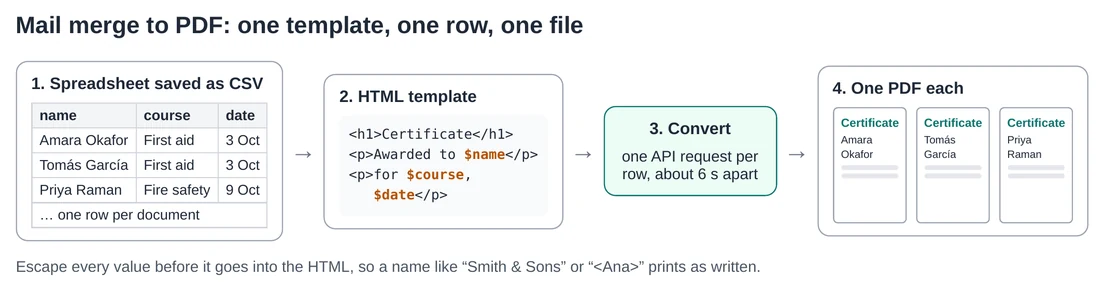
1. Save your spreadsheet as CSV
In Excel, Google Sheets or Numbers, export the sheet as CSV in UTF-8. Use short column names in the first row, without spaces, such as name, course and date.
2. Write the template
Write the document as normal HTML and put $column where each value goes. Here’s a minimal certificate; our certificate template is a fuller design you can adapt.
<!doctype html>
<html lang="en"><head><meta charset="utf-8"><title>Certificate for $name</title>
<style>
  html, body { margin: 0; }
  body { font-family: Georgia, serif; text-align: center; padding-top: 40mm; }
  h1 { font-size: 40pt; margin: 0 0 12mm; }
  .name { font-size: 28pt; font-weight: bold; }
</style></head>
<body>
  <h1>Certificate of completion</h1>
  <p>Awarded to</p>
  <p class="name">$name</p>
  <p>for completing $course on $date</p>
</body></html>
The template uses Python’s string.Template, so write $$ wherever you need a literal dollar sign, such as a price.
3. Run the script
import csv, html, re, time, unicodedata
from pathlib import Path
from string import Template
import requests

API = "https://htmltopdf.online/api/convert/html"
SETTINGS = {"paper": "A4", "landscape": True, "marginMm": 10}

template = Template(Path("certificate.html").read_text(encoding="utf-8"))
out = Path("pdfs")
out.mkdir(exist_ok=True)

with open("people.csv", newline="", encoding="utf-8-sig") as f:
    for number, row in enumerate(csv.DictReader(f), start=1):
        # Escape values so "Smith & Sons" or "<Ana>" print as written.
        page = template.substitute({k: html.escape(v) for k, v in row.items()})
        while True:
            r = requests.post(API, json={"html": page, "settings": SETTINGS}, timeout=60)
            if r.status_code != 429:
                break
            time.sleep(int(r.headers.get("Retry-After", "10")))
        r.raise_for_status()
        plain = unicodedata.normalize("NFKD", row["name"]).encode("ascii", "ignore").decode()
        slug = re.sub(r"[^a-z0-9]+", "-", plain.lower()).strip("-") or "document"
        (out / f"{number:03d}-{slug}.pdf").write_bytes(r.content)
        print("saved", number, row["name"])
        time.sleep(6.5)  # stay under 10 conversions a minute
It needs Python 3 and the requests package. Put certificate.html and people.csv in the same folder and run it. The numbered file names keep the PDFs in spreadsheet order, and the utf-8-sig encoding copes with the invisible marker Excel adds to the start of UTF-8 CSV files.
Why each safety line matters
html.escape: without it, a value containing&or<is read as HTML. A name like “<Ana>” would vanish from the PDF.- The 6.5-second pause: the free API allows 10 conversions a minute. A 100-row file takes about 11 minutes, so start it and do something else.
- The 429 loop: if the converter is busy, it answers 429 with a
Retry-Afterheader. The script waits that many seconds and tries again instead of skipping a row. substitute, notsafe_substitute: a typo in a column name stops the script with an error instead of printing “$nmae” on a certificate.
Ideas for the same pattern
- Invoices: one row per customer; start from our HTML invoice template and check what an invoice must include.
- Letters: personalised letters with the address placed for a window envelope, using
mmpositions. - Name badges: ten names per page is a better fit for a badge sheet than one PDF each.
For the API’s fields, limits and errors, see the free HTML to PDF API guide, and the Python csv documentation for other spreadsheet formats.